Apps
Updated on July 8, 2025 at 12:00



-

Solgar Vitamins
When it comes to longevity, resilience, and clean performance, Solgar has quietly set the gold standard since 1947. Trusted by those who expect more from their supplements, Solgar blends pharmaceutical-grade precision with a holistic, no-compromise ethos that's earned its spot in medicine cabinets worldwide. From the recovery-supporting power of Magnesium Citrate, to the oxygen-boosting benefits of Gentle Iron, and the immune fortification of Quercetin Complex with Ester-C, every formula is crafted for those who see wellness not as a trend — but as a lifestyle.
Presented by Solgar.
Consult a physician before consuming any new supplement. Any health claims made are solely those of the brand and not those of Uncrate LLC.
-
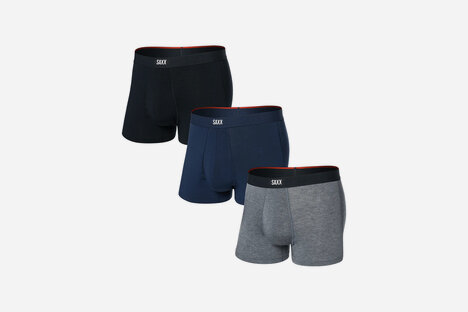
SAXX Vibe Xtra Trunks
SAXX takes comfort to the next level with the all-new Vibe Xtra Trunks, featuring Stop Drop Technology — a discreet moisture-wicking layer built into the signature BallPark Pouch for all-day dryness where it matters most. Made from super-soft EcoVero fabric with a fly front, these trunks deliver lightweight, breathable comfort, plus 4-way stretch, odor resistance, and an anti-roll waistband. Flat Out Seams prevent chafing, while Three-D Fit ensures a perfect anatomical fit. Sold in a convenient three-pack, the Vibe Xtra is a premium upgrade to your daily essential.
Presented by SAXX.




-
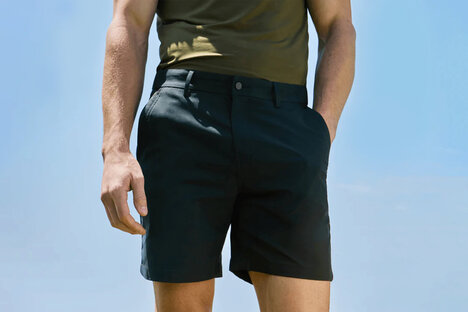
Jack Archer Jetsetter Shorts
For the man whose passport sees more stamps than dust, the Jack Archer Jetsetter Shorts are the essential uniform of elevated travel. Crafted with the discerning frequent flyer in mind, these shorts blend tailored aesthetics with ultimate performance. The sculpted waistband lifts with intention and ensures first-class comfort without compromise. Wrinkle-free, odor-resistant, and stain-repellent, they demand nothing and deliver everything. With fabric that adapts to motion and maintains its shape across time zones, the Jetsetter is proof that luxury doesn't pause for laundry. From Santorini to São Paulo, this is how you stay sharp without trying.
Presented by Jack Archer.
-
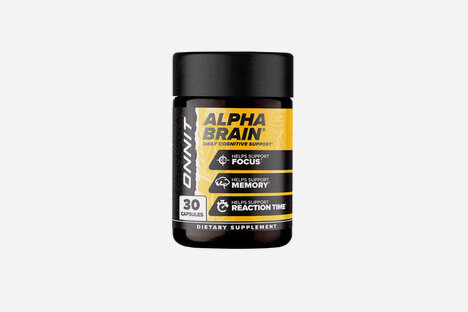
ONNIT Alpha BRAIN Supplements
For high-performers who treat clarity and speed of mind as non-negotiables, Onnit's Alpha BRAIN delivers a focused, caffeine-free edge for those pursuing their full potential. Backed by clinical trials and over 10 million bottles sold, this nootropic supports cognitive performance — boosting memory, mental speed, and executive function with a precise blend of Alpha-GPC, L‑Theanine, Vitamin B6, and Phosphatidylserine. Whether you're strategizing, creating, gaming, or navigating high-stakes moments, Alpha BRAIN promotes alpha wave production and supports acetylcholine levels to keep your mind sharp without the crash. Available in capsules or instant powder for travel, it's a tool that doesn't just power your day — it elevates it.
Presented by ONNIT.
Consult a physician before consuming any new supplement. Any health claims made are solely those of the brand and not those of Uncrate LLC.


-
PATRICKS Plus Range Shampoo and Conditioner
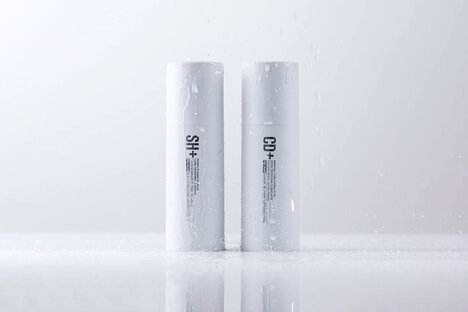
Hair loss may start quietly, but PATRICKS Plus Range makes sure it doesn't stay that way. Crafted with cutting-edge actives like Capixyl, Redensyl, Baicapil, and Procapil, this award-winning shampoo and conditioner duo works at the root — blocking DHT, boosting circulation, and reigniting follicle activity. Designed for daily use and all hair types, it's the ultimate ritual for men who demand thicker, stronger, fuller hair without compromise. Whether you're fighting fallout or fortifying for the future, the Plus Range turns your daily wash into a powerful defense, marrying advanced biotech with refined self-care.
Presented by PATRICKS.
-
Roderer Harry Aviator Sunglasses
The Roderer Harry Aviator Polarized Sunglasses are more than just eyewear — they're a signal. Handcrafted from stainless steel and finished in Gunmetal Black, they sharpen the timeless aviator silhouette into something bolder, more precise. Polarized lenses cut glare with surgical clarity, while innovative spring hinges and a flawless fit keep pace with high-speed itineraries and jet-set agendas. Subtle branding, a travel-ready case, and five global finishes round out the details. Whether you're stepping off a G650 or onto the flightline, takeoff towards the future.
Presented by Roderer.